JioMart Seller Login: Partner Portal Access
JioMart seller login guide: open identity.seller.jiomart.com, enter your User id, password and the sum captcha. Reset steps, seller IVR and support emails.
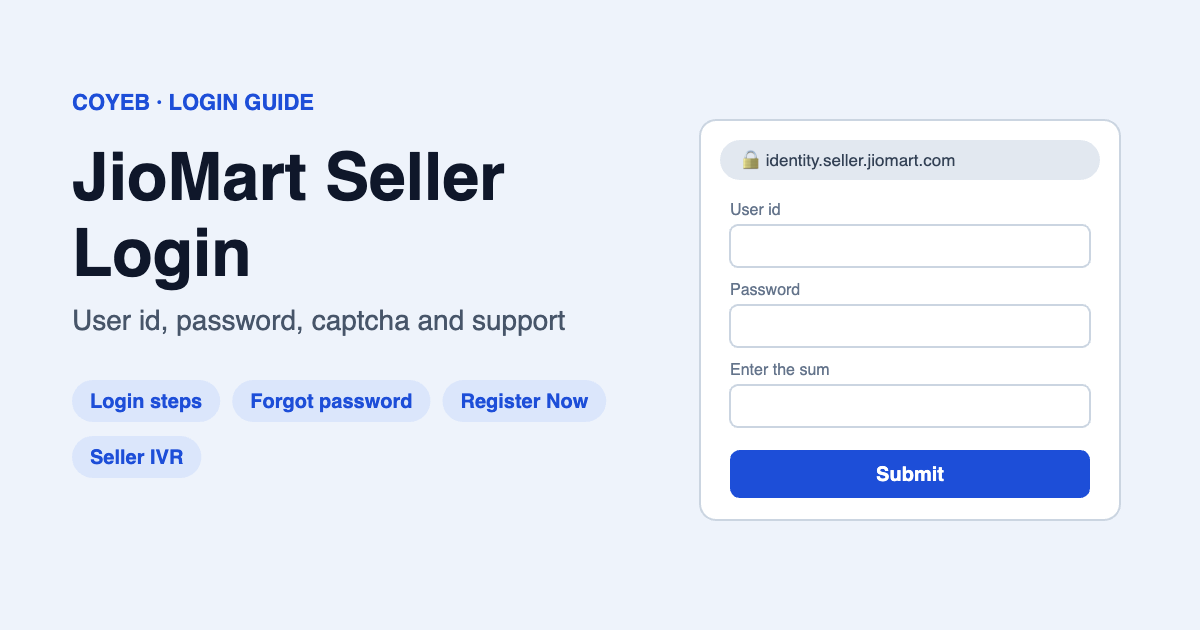
Quick answer: The JioMart seller login page is identity.seller.jiomart.com (it opens at /sso/login). Type your User id and Password, solve the small sum in the captcha box (Enter the sum), then click Submit. If you forgot your password, click Forgot your password?. It asks for your User id and a new sum.
Last verified: 14 November 2026 (we read JioMart’s seller login, password reset and registration screens).
Official JioMart seller login: identity.seller.jiomart.com
coyeb.com is not affiliated with JioMart or Reliance Retail. Never share your password or any OTP with anyone who calls or messages you.
JioMart seller login page: what you will see
The login screen is titled Login in to JioMart. It is for sellers who already have a JioMart seller account. It has only three things to fill in:
- User id *: the seller user ID for your account.
- Password *: your seller account password.
- Enter the sum: a simple maths captcha. If you can’t read it, click Reload Captcha to get a new one.
There is no “login with OTP” button on this screen. The box is labelled “User id”, so use the ID you were given for your seller account. Don’t type your shopping (customer) jiomart.com login here.
How to log in to JioMart Seller (step by step)
- Open identity.seller.jiomart.com in your browser. Check that the address bar shows identity.seller.jiomart.com before you type anything.
- In User id *, type your seller user ID.
- In Password *, type your password.
- Work out the sum shown in the captcha and type the answer in Enter the sum. Click Reload Captcha if it does not show clearly.
- Click Submit to open your seller account.
JioMart’s page says it works best on Microsoft Edge 81+, Mozilla Firefox 75+, Safari 5.1.5+ or Google Chrome 80+. If the page looks broken, update your browser first.
New seller? Register before you can log in
You can’t log in until you have a seller account. On the login page, JioMart shows Don’t have an account? Register Now to start selling.
- Click Register Now. The registration page (identity.seller.jiomart.com/seller_registration) is headed Start Selling Your Products on JioMart. Sign Up Now!
- The page says Create your Organisation’s Seller Account, and notes that registration “should be done by an authorized person” of your business.
- Click Review Terms & Conditions, read them, and tick I have read and agree to the Terms & Conditions of JioMart to continue the sign-up.
The login page also offers an Express Interest Form (“Express your interest by requesting an invite”). JioMart does not list the documents on the first sign-up screen. One third-party seller guide lists GSTIN, PAN and bank details; we could not confirm this on JioMart’s own pages. Follow what the registration form actually asks for.
If you have questions before registering, JioMart says to write to seller.onboarding@jiomart.com (for people not yet registered).
Forgot your JioMart seller password?
- On the login page, click Forgot your password?. The page heading is Forgot your password ?
- Type your User id *.
- Solve the new sum in Enter the sum (use Reload Captcha if needed).
- Click Submit and follow the instructions JioMart gives you after that.
The reset screen asks only for your User id. If you don’t remember your User id, you can write to Seller.Support@jiomart.com. JioMart asks you to write from your registered email ID.
JioMart seller login on mobile
The seller login is a normal web page. We checked it on desktop, but you can try opening identity.seller.jiomart.com in your phone’s browser with the same User id and password.
We could not confirm an official JioMart seller panel app. An app with “JioMart” in its name is not always the seller panel. If you install one, check the developer details on the store listing carefully, and prefer the web login. Never install a seller “APK” from a website or a WhatsApp link. When in doubt, use the web login.
JioMart seller login not working? Common problems
| What you see | Likely reason | What you can try |
|---|---|---|
| Login fails after you click Submit | Wrong User id or password, or the sum answer was wrong | Retype the User id (no spaces), check Caps Lock, click Reload Captcha and enter the new sum |
| Captcha sum is hard to read | Image did not load fully | Click Reload Captcha, or refresh the page |
| You only know your email, not your User id | The form asks for the seller User id | Email Seller.Support@jiomart.com from your registered email ID |
| Page layout broken or buttons don’t work | Old browser | Use Edge 81+, Firefox 75+, Safari 5.1.5+ or Chrome 80+ (JioMart’s listed browsers), clear the cache, or try a private window |
| You registered but can’t log in | Your seller account may not be ready yet | Write to seller.onboarding@jiomart.com or call the seller IVR 1800 8896 000 |
We found no official list of JioMart seller login error messages. The reasons and fixes above are general suggestions, not steps published by JioMart.
JioMart seller customer care: the right number and emails
These contacts are shown on JioMart’s own seller portal (checked November 2026):
- Registered sellers: Seller.Support@jiomart.com. JioMart asks you to write “from your registered email ID”.
- Not yet registered: seller.onboarding@jiomart.com
- Seller IVR number: 1800 8896 000, “during business hours”. The portal does not state the exact hours.
Some third-party sites list 1800 890 1222 as the seller helpline, but jiomart.com shows that number for customers, and it does not appear on the seller login pages we checked. For seller account and login problems, use the seller IVR and emails above.
Stay safe when you log in
- The official seller login address we verified is identity.seller.jiomart.com. Check the address bar every time.
- Never give your password, User id or any OTP to a caller, “account manager” or WhatsApp contact. No one needs your password to help you.
- Phone numbers printed on third-party websites may belong to private agencies, not JioMart. Use the contacts on the seller portal.
- If someone offers to “activate” or “approve” your seller account for a fee, don’t pay. Write to JioMart’s seller emails instead.
Other seller login guides
Selling on more than one marketplace? See our Myntra seller login guide and Flipkart seller login guide.
FAQ
What is the JioMart seller login URL?
It is identity.seller.jiomart.com. The page opens at identity.seller.jiomart.com/sso/login, with the title “Login in to JioMart”.
Can I log in to JioMart Seller with my email?
The login box is labelled “User id”, not email. Use the seller User id for your account. If you only know your registered email, write to Seller.Support@jiomart.com from that email.
Can I log in to JioMart Seller with OTP?
The login screen we checked has no OTP login option. It asks for User id, password and a sum captcha.
How do I reset my JioMart seller password?
Click “Forgot your password?” on the login page, enter your User id and the captcha sum, then click Submit and follow JioMart’s instructions.
What is the JioMart seller customer care number?
The seller portal lists the IVR number 1800 8896 000 (business hours), plus Seller.Support@jiomart.com for registered sellers and seller.onboarding@jiomart.com for new sellers.
How do I register as a JioMart seller?
Click “Register Now” on the login page. The registration page says “Create your Organisation’s Seller Account” and asks you to review and accept JioMart’s Terms & Conditions. JioMart says registration should be done by an authorized person.